Clean Notes: Write Beautifully and Neatly
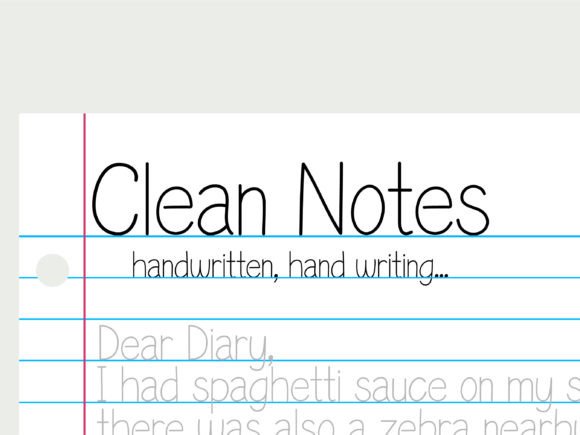
There’s something quietly powerful about handwriting—its rhythm, its imperfection, its humanity. But not all digital handwriting fonts capture that warmth without sacrificing clarity. Clean Notes bridges that gap. It’s a carefully crafted font designed to mimic the natural flow of pen-on-paper while ensuring every letter remains legible, balanced, and visually cohesive—even at small sizes or on low-resolution screens.
Unlike generic script fonts that blur into decorative noise or rigid monospaced alternatives that feel sterile, Clean Notes strikes a thoughtful middle ground. Its letterforms have gentle slant, subtle variation in stroke weight, and open counters—details that make words breathe on screen. And because it’s built as a standard TrueType or OpenType font, it works instantly in any note-taking app, word processor, design tool, or presentation software you already use—no plugins, no subscriptions, no learning curve.
Why “Beautiful and Legible” Matters—Differently for Different People
What makes a font “right” isn’t universal—it depends on how you work, what you create, and what your eyes (and your audience’s) need from text.
For educators and students
Clarity is non-negotiable. A teacher sharing handwritten-style lesson notes or study guides needs readers to grasp meaning—not decode cursive. Clean Notes delivers soft curves and consistent spacing so annotations, definitions, or step-by-step explanations stay readable across devices. One high school science instructor uses it to draft lab handouts in Notion; her students report fewer misreadings of chemical symbols or units than with other script fonts.
For creators and visual communicators
Designers, bloggers, and content makers often seek authenticity without sacrificing polish. Clean Notes adds personality to mood boards, client proposals, or social media graphics—without triggering the “unprofessional” reflex some scripts do. A freelance illustrator uses it for captioning sketchbook scans before posting to Instagram: the font echoes her hand-drawn aesthetic but stays crisp when scaled down for mobile feeds.
For professionals managing daily notes
Lawyers, project managers, and consultants take notes fast—and revisit them later under time pressure. Clean Notes supports speed *and* recall: letters are distinct enough to prevent confusion between “a” and “o”, “l” and “1”, or “b” and “h”. A marketing strategist told us she switched from a popular handwriting font after realizing she’d misread “Q3 goals” as “Q8 goals” twice in one month. With Clean Notes, that ambiguity vanished.
For entrepreneurs and small business owners
When you’re building brand materials in-house—think workshop worksheets, onboarding checklists, or customer-facing PDFs—consistency matters. Clean Notes renders reliably across Windows, macOS, iOS, and Android. No surprise substitutions. No missing glyphs. That means your client-ready document looks intentional whether opened in Preview, Adobe Acrobat, or Google Docs—no last-minute font swaps before sending.
What You Might Prioritize—And How Clean Notes Fits
Your priorities shape how you’ll experience Clean Notes. Here’s how common needs line up:
- Ease of use: Install once, use everywhere. No setup beyond dragging the .ttf file into your system’s font folder—or double-clicking to install on most OSes.
- Quality over novelty: It doesn’t try to be ornamental. There are no flourishes, no exaggerated loops, no forced calligraphy. Just honest, even-handed letterforms grounded in typographic best practices.
- Flexibility: Works equally well for bullet-pointed meeting notes, journal entries, annotated PDFs, or layered Figma mockups. Supports standard Latin characters, numerals, punctuation, and common diacritics.
- Presentation value: Because it avoids visual fatigue, documents using Clean Notes hold attention longer—especially in long-form notes or printed handouts where readability impacts retention.
- Long-term usefulness: As operating systems update and apps evolve, system-compatible fonts like Clean Notes remain stable. You won’t wake up to find your carefully styled notes suddenly defaulting to Arial.
Real-World Use Cases—No Special Tools Required
You don’t need design expertise to benefit. Try these practical starting points:
- In Obsidian or Logseq: Apply Clean Notes to your daily notes CSS snippet or theme settings. Instantly transforms dry task lists into warm, approachable records—ideal if you review past entries weekly.
- In Apple Notes or OneNote: Change the default font in your app’s formatting toolbar. Your typed notes gain subtle texture—helpful when distinguishing personal reflections from action items.
- In Canva or Figma: Pair Clean Notes with a clean sans-serif (like Inter or Helvetica Neue) for contrast—headings in Clean Notes, body text in sans. Creates hierarchy *and* character.
- In Notion databases: Use it for “Notes” or “Reflection” properties via custom CSS (with supported browsers). Makes internal documentation feel more human—without compromising searchability or sorting.
Who Might Look Elsewhere?
Clean Notes isn’t meant to replace expressive display fonts for logos or posters—and it doesn’t include stylistic alternates, swashes, or multilingual extensions beyond basic Western European languages. If your work regularly involves Arabic, Devanagari, or Vietnamese diacritics beyond standard Unicode coverage, you’ll want to verify glyph support before committing.
It also doesn’t solve handwriting *recognition*—it’s purely a visual layer. So if you rely on iPad or Surface pen-to-text conversion, Clean Notes won’t change how your device interprets strokes. But it *will* make the output of those tools look more intentional when exported or shared.
Does It Fit Your Workflow?
Ask yourself:
- Do you often wish your typed notes felt more personal—but still stayed easy to scan?
- Do you reuse notes across platforms and get frustrated when fonts shift or break alignment?
- Are you drawn to handwritten aesthetics but avoid them because they hurt readability?
- Do you value consistency more than trendiness in your everyday tools?
If yes, Clean Notes likely fits—not as a flashy upgrade, but as a quiet, dependable refinement. It won’t overhaul your process. But it may make the act of writing feel more inviting, the result more trustworthy, and the re-reading experience less taxing.
Because great note-taking isn’t just about capturing ideas. It’s about honoring the time you spend thinking—and giving those thoughts a form that invites return visits, clear understanding, and calm focus. Clean Notes helps with that. One beautifully formed letter at a time.