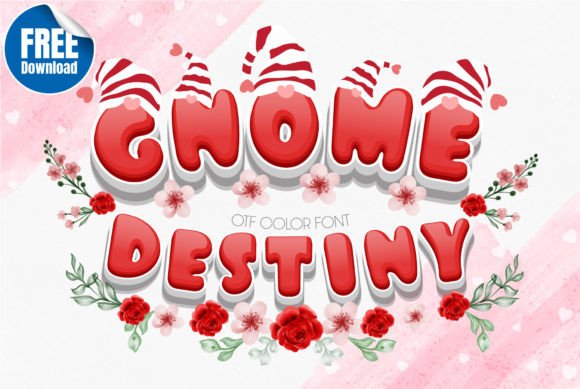
Gnome Destiny: The Playful, Color-Rich Font That Brings Joy to Kids’ Designs
Imagine a font that doesn’t just say “hello”—it waves, giggles, and hands you a tiny paper crown. That’s Gnome Destiny. It’s not just another decorative typeface. It’s a cheerful, hand-drawn color font built for warmth, whimsy, and instant visual delight—especially when your audience is under twelve or your project lives in the joyful chaos of classroom walls, storybook covers, or birthday party invites.
What Makes Gnome Destiny Stand Out in a Sea of Cute Fonts?
There are plenty of playful fonts out there—but Gnome Destiny delivers something rarer: authentic, built-in color. As an OpenType-SVG font, it renders full-color glyphs natively—not as layered shapes or manual fills, but as intentional, vibrant, pixel-perfect illustrations embedded directly into each letter. That means the polka-dot “O”, the glittery “G”, or the candy-striped “N” appear exactly as designed—no extra steps, no guesswork.
This isn’t a trick or a workaround. It’s how modern design software interprets SVG data inside font files. And because Gnome Destiny was crafted with this capability front and center, every character feels like a tiny illustration—complete with gradients, textures, shadows, and even subtle transparency effects.
Where It Shines (and Where It Doesn’t)
Gnome Destiny thrives in environments where personality matters more than precision—and where color is non-negotiable. Think:
- Classroom posters with themed vocabulary words (“Rainbow” spelled in rainbow letters, “Forest” with leafy “F” and mossy “T”)
- Digital storybooks where each chapter title pops with character-specific hues
- Printable worksheets with friendly headers that ease anxiety around learning
- Social media graphics for preschools, tutoring centers, or children’s book authors
- SVG-based craft projects—like layered vinyl decals for kids’ rooms or school supply labels
But here’s what’s equally important: Gnome Destiny isn’t built for every tool. Its OTF and TTF files are intentionally not compatible with Cricut Design Space. Why? Because Cricut doesn’t currently support OpenType-SVG rendering—the very feature that makes Gnome Destiny so expressive. If you’re planning to cut physical vinyl or iron-on designs on a Cricut machine, you’ll need to convert or outline the text first (which strips away the color). That’s not a flaw—it’s a trade-off for richer digital expression.
Compatible Tools: Where Gnome Destiny Comes Alive
The magic of Gnome Destiny unfolds in apps that speak its language. Here’s where it works seamlessly:
- Adobe Photoshop (CC 2017+): Type with color, then scale, warp, or layer without losing fidelity.
- Adobe Illustrator (CC 2018+): Edit individual glyphs, recolor via global swatches, or export as vector-rich SVGs for web use.
- Silhouette Studio (Business Edition or Designer Edition): Use it for print-and-cut projects—just remember to embed or flatten before sending to your Silhouette cutter if needed.
- Inkscape (v1.0+): Fully supported with native SVG glyph rendering—ideal for educators and hobbyists who rely on free, open-source tools.
No workarounds. No plugins. Just install, select, and type—and watch letters bloom with life.
Why Color Fonts Are Changing How We Design for Young Learners
Color isn’t just decoration in early education—it’s cognition. Research shows that young children process color faster than shape or form, and consistent color-coding supports memory, emotional regulation, and task orientation. When a math worksheet header uses Gnome Destiny’s warm yellow “Addition” or cool blue “Subtraction”, students don’t just read the word—they feel its tone.
That’s why teachers love pairing Gnome Destiny with tactile elements: laminated flashcards, interactive whiteboard activities, or printable emotion charts where “Happy” glows in sunbeam yellow and “Calm” rests in soft lavender. It bridges digital creation and real-world engagement—without needing extra design skills.
Practical Tips for Getting the Most From Gnome Destiny
You don’t need to be a font expert to make Gnome Destiny work beautifully. A few simple habits go a long way:
- Start small: Try it on one headline or banner before building full layouts. Its charm is strongest at medium-to-large sizes (36pt+), where details like star-speckled “S” or flower-petal “A” truly shine.
- Pair thoughtfully: Let Gnome Destiny be the voice; choose clean, legible sans-serifs (like Montserrat or Nunito) for body text. Contrast creates clarity.
- Test before printing: While screen rendering is flawless, some printers may rasterize SVG glyphs differently. Always do a test print—especially for multi-page handouts or photo books.
- Respect file limits: Because each glyph contains vector + color data, Gnome Destiny files are larger than standard OTFs. Keep that in mind when sharing editable files with collaborators or uploading to cloud-based platforms with size restrictions.
Real-World Use Cases You Can Try This Week
Here’s how designers, teachers, and small-business owners are already using Gnome Destiny:
- A homeschool mom created a weekly “Chore Chart” where each task (“Feed Pets”, “Water Plants”) appears in matching colors—and her kids now ask to update it themselves.
- A children’s illustrator used Gnome Destiny to design chapter titles for a self-published picture book. Readers consistently comment on how “the letters smile back.”
- A summer camp printed 200 name tags using Gnome Destiny in custom color combos—each camper got a unique hue tied to their cabin theme. No two were alike, and the file stayed fully editable until final output.
Before You Download: What to Know About Licensing & Setup
Gnome Destiny comes with a clear, straightforward license: personal and commercial use included. Whether you’re designing a flyer for your daughter’s lemonade stand or branding a nationwide educational app, you’re covered—as long as you’re using it as intended (i.e., not extracting and reselling the SVG assets separately).
Installation is simple—but timing matters. On Windows, right-click the .OTF file and choose “Install for all users.” On Mac, double-click and hit “Install Font” in Font Book. Then restart your design app. Don’t skip the restart—some apps cache fonts aggressively, and Gnome Destiny won’t appear in your font menu until it’s fully registered.
Stuck? Our Ultimate Font Guide walks through troubleshooting SVG fonts in each supported program—including how to reset preferences in Illustrator or enable advanced typography in Photoshop. It’s written for humans, not developers—clear, step-by-step, and kind.
Final Thought: It’s More Than a Font—It’s an Invitation
Gnome Destiny doesn’t shout. It leans in. It winks. It remembers that creativity starts with feeling safe enough to try—and that sometimes, the most powerful design decision you can make is choosing a font that says, “You belong here.”
Whether you’re sketching lesson plans at midnight, prepping for parent-teacher conferences, or launching your first Etsy shop selling printable planners—Gnome Destiny meets you where you are. Not as a tool to master, but as a friend to collaborate with.
And in a world full of sharp edges and fast deadlines, that kind of sweetness isn’t just charming—it’s essential.